Abstract
Amazon S3 Replication lets you automatically copy objects across S3 buckets — within the same Region or across different Regions, within one AWS account or across accounts. It’s a key primitive for building resilient, compliant, and globally distributed storage architectures.
Why It Matters
Replication enables disaster recovery, data sovereignty compliance, multi-region active-active architectures, and log aggregation — all without writing a single line of custom sync logic.
Replication Types Overview
S3 offers two broad categories of replication:
| Category | Mechanism | When Objects Are Copied |
|---|---|---|
| Live Replication | CRR or SRR rules | Automatically, as new objects are written |
| On-Demand Replication | S3 Batch Replication | On demand — for existing or previously failed objects |
Live Replication
Cross-Region Replication (CRR) copies objects to a bucket in a different AWS Region. Use it to:
- Meet compliance requirements for geographic data separation
- Reduce read latency for globally distributed users
- Keep compute clusters in multiple Regions in sync with the same dataset
Same-Region Replication (SRR) copies objects to a bucket in the same Region. Use it to:
- Aggregate logs from multiple buckets or accounts into one central bucket
- Keep production and test environments in sync with live data
- Satisfy data sovereignty laws requiring multi-copy storage within a single country
On-Demand: S3 Batch Replication
Batch Replication runs as an S3 Batch Operations job. Unlike live replication, it targets existing objects rather than just new writes. Use it to:
- Backfill objects that existed before you enabled a replication rule
- Retry objects that previously failed to replicate (status =
FAILED) - Copy objects to newly added destination buckets
- Replicate replicas themselves (only possible with Batch Replication)
Architecture Diagram
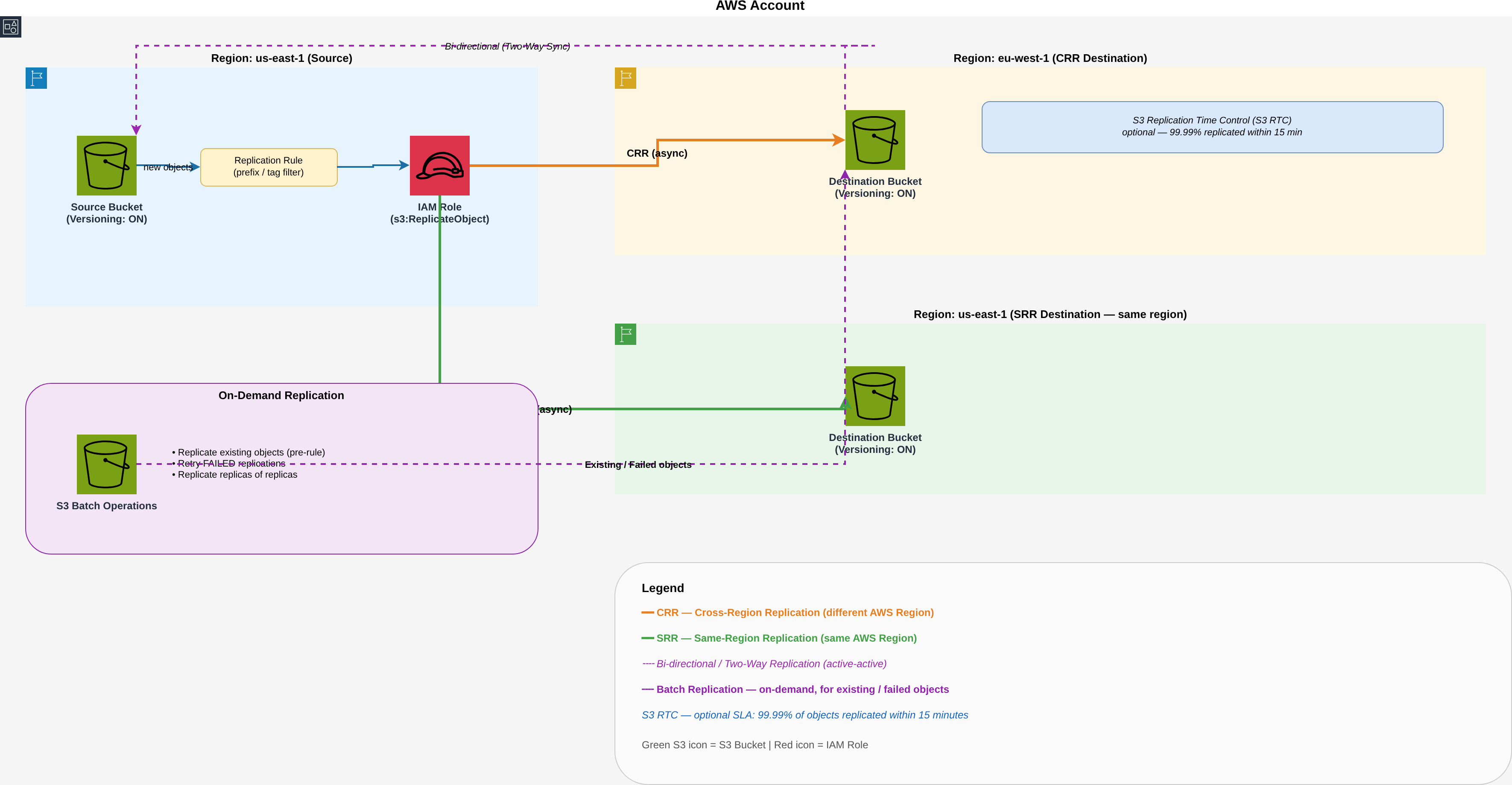
Bi-Directional (Two-Way) Replication
Bi-directional replication keeps two buckets fully in sync — including object metadata changes (ACLs, tags, object lock settings) via Replica Modification Sync.
Use it when:
- Building shared datasets across multiple Regions (active-active pattern)
- Configuring S3 Multi-Region Access Point failover — data written to the failover Region must sync back to the primary
- Needing high availability even during regional disruptions
Set Up Both Directions Before Traffic
Configure bi-directional rules on both buckets before enabling Multi-Region Access Point failover controls. If you set failover first, writes to the secondary won’t replicate back.
Cross-Account & Cross-Organization Replication
Cross-account replication copies objects from a bucket in one AWS account to a bucket in a completely separate account — a common pattern for centralizing data, isolating prod from dev, or migrating between accounts. It also works across AWS Organizations boundaries (different Org or management accounts).
Real-World: 2+ TB Cross-Account Migration
Migrated 2+ TB of S3 data across AWS accounts using CRR with Batch Replication to backfill existing objects. The combination of live replication rules (for new writes) and a Batch Replication job (for pre-existing objects) handled the full dataset without any custom tooling or
aws s3 syncscripting.
How It Works
The key difference from same-account replication is the bucket policy on the destination — you must explicitly grant the source account’s IAM replication role permission to write objects.
Step 1 — Destination bucket policy (in the target account)
{
  "Version": "2012-10-17",
  "Statement": [
    {
      "Sid": "AllowCrossAccountReplication",
      "Effect": "Allow",
      "Principal": {
        "AWS": "arn:aws:iam::SOURCE_ACCOUNT_ID:role/s3-replication-role"
      },
      "Action": [
        "s3:ReplicateObject",
        "s3:ReplicateDelete",
        "s3:ReplicateTags",
        "s3:GetBucketVersioning",
        "s3:PutBucketVersioning"
      ],
      "Resource": [
        "arn:aws:s3:::my-destination-bucket",
        "arn:aws:s3:::my-destination-bucket/*"
      ]
    }
  ]
}
Step 2 — Replication configuration (source account)
Add Account and AccessControlTranslation to transfer object ownership to the destination account. Without this, replicated objects are owned by the source account and the destination account can’t read them.
{
  "Role": "arn:aws:iam::SOURCE_ACCOUNT_ID:role/s3-replication-role",
  "Rules": [
    {
      "ID": "cross-account-replicate-all",
      "Status": "Enabled",
      "Filter": {},
      "Destination": {
        "Bucket": "arn:aws:s3:::my-destination-bucket",
        "Account": "DESTINATION_ACCOUNT_ID",
        "AccessControlTranslation": { "Owner": "Destination" },
        "StorageClass": "STANDARD_IA"
      },
      "DeleteMarkerReplication": { "Status": "Enabled" }
    }
  ]
}
Cross-Org Considerations
When source and destination are in different AWS Organizations:
| Concern | Detail |
|---|---|
| SCP (Service Control Policies) | Ensure SCPs in both Orgs allow s3:ReplicateObject and s3:PutObject — a restrictive SCP silently blocks replication with no error in the console |
| KMS cross-account | If objects are SSE-KMS encrypted, the destination account’s replication role needs a KMS key grant from the source account’s KMS key |
| Object ownership | Always set AccessControlTranslation: Owner=Destination — without it, replicated objects remain owned by the source account and the destination can’t access them |
| Monitoring | Enable per-rule CloudWatch metrics; OperationFailedReplication events fire on SNS/SQS when cross-account permission issues block replication |
Backfilling 2+ TB with Batch Replication
Live replication rules only apply to new objects written after the rule is created. For existing data:
- Enable the live replication rule first (covers new writes immediately)
- Create an S3 Batch Replication job to backfill existing objects:
aws s3control create-job \
  --account-id SOURCE_ACCOUNT_ID \
  --operation '{"S3ReplicateObject": {}}' \
  --report '{"Bucket":"arn:aws:s3:::my-report-bucket","Prefix":"batch-replication","Enabled":true,"ReportScope":"AllTasks"}' \
  --manifest-generator '{
    "S3JobManifestGenerator": {
      "SourceBucket": "arn:aws:s3:::my-source-bucket",
      "EnableManifestOutput": false,
      "Filter": {"EligibleForReplication": true}
    }
  }' \
  --priority 10 \
  --role-arn arn:aws:iam::SOURCE_ACCOUNT_ID:role/s3-replication-role \
  --no-confirmation-required
Batch Job Progress
Monitor the job in the S3 console under Batch Operations — it shows objects succeeded, failed, and total bytes processed. For 2+ TB expect the job to run for several hours depending on object count and average size.
Replicas of Replicas
If the destination bucket already received replicated objects from another rule, those objects carry
x-amz-replication-status: REPLICA. Live rules cannot re-replicate replicas — only Batch Replication can. UseFilter: {"EligibleForReplication": true}to include them.
Requirements & Prerequisites
Hard Requirements
- Versioning must be enabled on both source and destination buckets
- Source and destination can be in the same or different AWS accounts
- The IAM role used must have
s3:GetReplicationConfiguration,s3:ReplicateObject,s3:ReplicateDelete,s3:ReplicateTags
Additional considerations:
| Requirement | Detail |
|---|---|
| Bucket ownership | Same account or cross-account (owner override available) |
| Storage class | Replicas can target a different storage class (Glacier, IA, etc.) |
| Delete markers | Not replicated by default; must explicitly enable delete marker replication |
| Lifecycle-deleted objects | Never replicated |
| Encrypted objects | SSE-S3 and SSE-KMS supported; KMS key permissions required for KMS-encrypted objects |
| Object size | Objects up to 5 TB are supported |
Setup — Live Replication (Console / CLI)
Step 1 — Enable Versioning on Both Buckets
aws s3api put-bucket-versioning \
  --bucket my-source-bucket \
  --versioning-configuration Status=Enabled

aws s3api put-bucket-versioning \
  --bucket my-destination-bucket \
  --versioning-configuration Status=Enabled
Step 2 — Create the IAM Role
{
  "Version": "2012-10-17",
  "Statement": [
    {
      "Effect": "Allow",
      "Action": [
        "s3:GetReplicationConfiguration",
        "s3:ListBucket"
      ],
      "Resource": "arn:aws:s3:::my-source-bucket"
    },
    {
      "Effect": "Allow",
      "Action": [
        "s3:GetObjectVersionForReplication",
        "s3:GetObjectVersionAcl",
        "s3:GetObjectVersionTagging"
      ],
      "Resource": "arn:aws:s3:::my-source-bucket/*"
    },
    {
      "Effect": "Allow",
      "Action": [
        "s3:ReplicateObject",
        "s3:ReplicateDelete",
        "s3:ReplicateTags"
      ],
      "Resource": "arn:aws:s3:::my-destination-bucket/*"
    }
  ]
}
Step 3 — Apply the Replication Configuration
aws s3api put-bucket-replication \
  --bucket my-source-bucket \
  --replication-configuration '{
    "Role": "arn:aws:iam::123456789:role/s3-replication-role",
    "Rules": [
      {
        "ID": "replicate-all",
        "Status": "Enabled",
        "Filter": {},
        "Destination": {
          "Bucket": "arn:aws:s3:::my-destination-bucket",
          "StorageClass": "STANDARD_IA"
        },
        "DeleteMarkerReplication": { "Status": "Enabled" }
      }
    ]
  }'
Prefix/Tag Filtering
Use the
Filterblock to replicate only a subset of objects — e.g., filter by prefixlogs/or by an object tagreplicate=true. This keeps replication costs controlled.
S3 Replication Time Control (S3 RTC)
By default, live replication is asynchronous with no SLA — most objects replicate within minutes, but there’s no guarantee. S3 RTC adds an SLA: 99.99% of new objects replicate within 15 minutes.
Enable it in the replication configuration:
"ReplicationTime": {
  "Status": "Enabled",
  "Time": { "Minutes": 15 }
},
"Metrics": {
  "Status": "Enabled",
  "EventThreshold": { "Minutes": 15 }
}
S3 RTC Cost
S3 RTC incurs additional per-object and per-GB charges on top of standard replication costs. Only enable it when your workload requires a guaranteed replication SLA (e.g., compliance or active-active failover).
Workload Selection Guide
| Requirement | Use |
|---|---|
| Replicate new objects across Regions | CRR |
| Replicate new objects within same Region | SRR |
| Replicate existing objects / backfill | Batch Replication |
| Replicate objects with a 15-minute SLA | CRR + S3 RTC |
| Keep two buckets fully in sync (active-active) | Bi-directional CRR |
| Data sovereignty — stay in one Region, multiple copies | SRR |
| Aggregate logs from many accounts | SRR |
| Cross-account replication | CRR or SRR + destination bucket policy granting source role |
| Cross-account, backfill existing data | Live CRR rule (new writes) + Batch Replication job (existing objects) |
| Cross-Org with SCPs | Verify SCPs allow s3:ReplicateObject in both Orgs + set AccessControlTranslation: Owner=Destination |
Monitoring Replication
Three mechanisms to track replication health:
1. Replication Metrics (CloudWatch) Enable per-rule metrics to track:
ReplicationLatency— seconds objects wait before being replicatedBytesPendingReplication— data volume backlogOperationsPendingReplication— object count in queue
2. S3 Event Notifications
Subscribe to s3:Replication:* events via SNS, SQS, or EventBridge:
OperationMissedThreshold— object didn’t replicate within thresholdOperationReplicatedAfterThreshold— replicated, but lateOperationNotTracked/OperationFailedReplication
3. Object Replication Status
Each object carries a x-amz-replication-status metadata header:
PENDING— awaiting replicationCOMPLETED— successfully replicatedFAILED— replication attempt failedREPLICA— this object is itself a replica
Key Considerations
| Aspect | Detail |
|---|---|
| Replication is async | Objects replicate after the write completes — no strong consistency guarantee across buckets |
| Versioning required | Both source and destination must have versioning enabled |
| Delete markers | Not replicated by default; enable explicitly per rule |
| Replicas of replicas | Only replicable via Batch Replication, not live rules |
| KMS encryption | Requires explicit KMS key grants to the replication IAM role |
| Cost components | Data transfer (CRR only), per-request charges, optional S3 RTC surcharge |
| Lifecycle rules | Apply independently on destination; replicated objects follow destination lifecycle |
| Owner override | Use to change object ACL ownership to the destination account |