Abstract
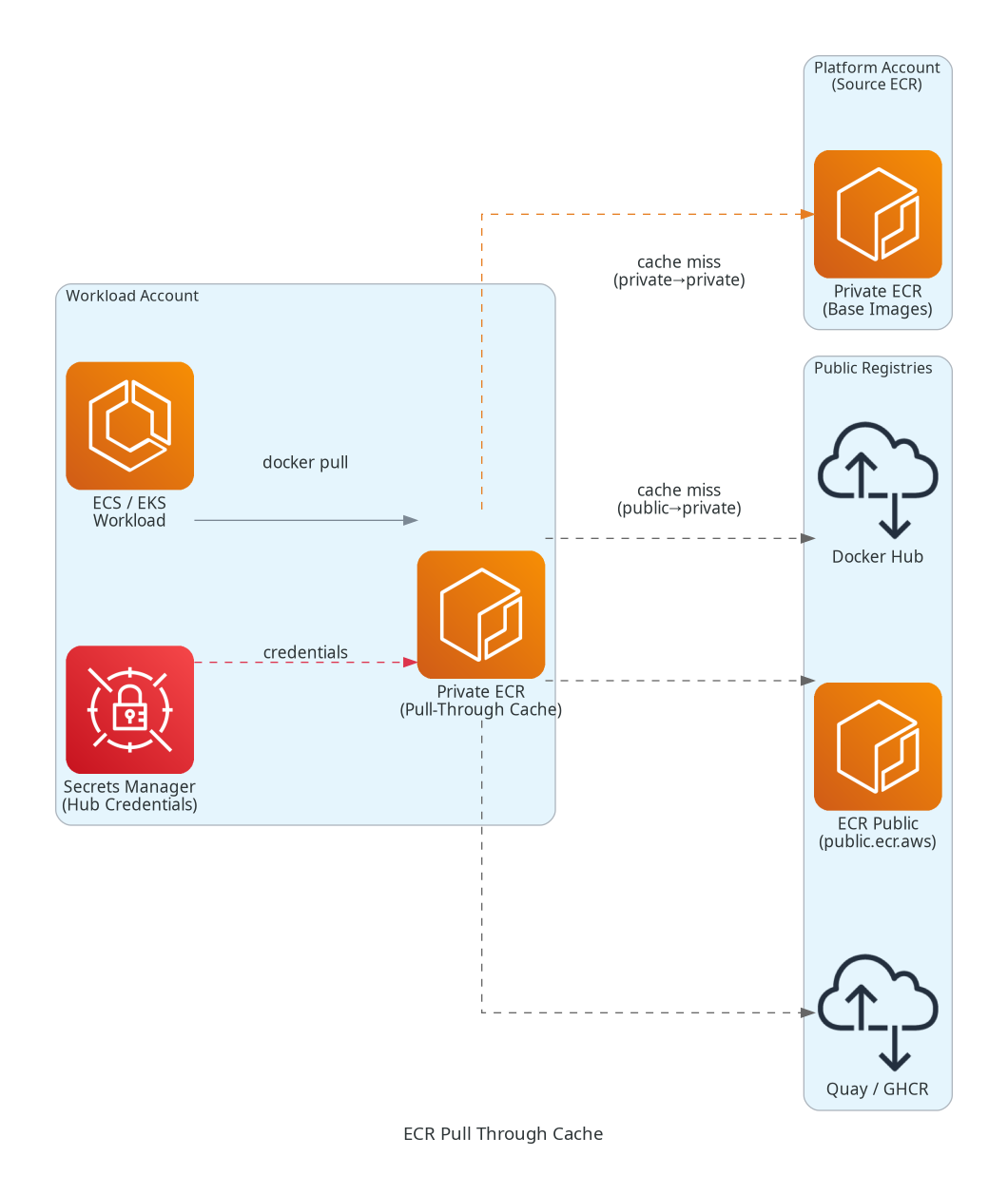
ECR Pull Through Cache lets you mirror container images from upstream registries into your own Amazon ECR private registry automatically — on first pull. Instead of hitting Docker Hub or a remote ECR every time, your workloads pull from a local cache that stays fresh.
Why It Matters
Reduces egress costs, eliminates rate-limit issues (Docker Hub), speeds up cold starts, and gives you a single controlled source of truth for images.
How Pull Through Cache Works
Developer / ECS / EKS
        │
        ▼
  Private ECR (your account)
  ecr.aws/<prefix>/library/nginx:latest
        │  ← cache miss? fetch upstream
        ▼
  Upstream Registry
  (Docker Hub / ECR Public / another Private ECR)
- You define a cache rule — mapping a namespace prefix in your private ECR to an upstream registry.
- On first
docker pull, ECR fetches from upstream, stores it in your registry. - Subsequent pulls hit the local cache (refreshed every 24 hours automatically).
Scenario 1 — Public to Private (Docker Hub → ECR)
This is the most common use case: cache Docker Hub or ECR Public images to avoid rate limits and reduce pull latency.
Supported upstream registries:
- Docker Hub (
registry-1.docker.io) - ECR Public (
public.ecr.aws) - Quay, Kubernetes Registry, GitHub Container Registry
Steps:
# 1. Create a secret in Secrets Manager (for Docker Hub auth)
aws secretsmanager create-secret \
  --name ecr-pullthroughcache/docker \
  --secret-string '{"username":"<hub_user>","accessToken":"<hub_token>"}'

# 2. Create the pull-through cache rule
aws ecr create-pull-through-cache-rule \
  --ecr-repository-prefix "dockerhub" \
  --upstream-registry-url "registry-1.docker.io" \
  --credential-arn arn:aws:secretsmanager:<region>:<account>:secret:ecr-pullthroughcache/docker
Pull image via cache:
docker pull <account>.dkr.ecr.<region>.amazonaws.com/dockerhub/library/nginx:latestIAM Requirement
Your IAM role/user needs
ecr:CreateRepository— ECR auto-creates the mirrored repo on first pull.
Scenario 2 — Private to Private (Cross-Account ECR → ECR)
Available since 2023
You can now use another private ECR registry (even cross-account) as an upstream for pull-through cache.
Use case: Centralised image registry in a platform/tooling account → cache into workload accounts.
Platform Account ECR (source)
  123456789.dkr.ecr.us-east-1.amazonaws.com/base-images/

        Pull Through Cache Rule
                │
                ▼

Workload Account ECR (cache destination)
  987654321.dkr.ecr.us-east-1.amazonaws.com/platform/base-images/app:v1
Steps:
# In workload account — create cache rule pointing to platform account ECR
aws ecr create-pull-through-cache-rule \
  --ecr-repository-prefix "platform" \
  --upstream-registry-url "123456789.dkr.ecr.us-east-1.amazonaws.com" \
  --upstream-registry "ecr"
Cross-Account Permissions
The source ECR must grant
ecr:BatchGetImageandecr:GetDownloadUrlForLayerto the destination account via a registry policy.
{
  "Version": "2012-10-17",
  "Statement": [{
    "Effect": "Allow",
    "Principal": { "AWS": "arn:aws:iam::987654321:root" },
    "Action": [
      "ecr:BatchGetImage",
      "ecr:GetDownloadUrlForLayer",
      "ecr:DescribeImages"
    ]
  }]
}
Architecture Diagram
Key Considerations
| Aspect | Detail |
|---|---|
| Cache refresh | Every 24 hours (automatic) |
| Repo auto-creation | ECR creates mirrored repos on first pull |
| IAM needed | ecr:CreateRepository, ecr:BatchImportUpstreamImage |
| Secrets Manager | Required for authenticated upstreams (Docker Hub) |
| Cross-account | Source registry needs a registry policy granting pull access |
| Supported upstreams | Docker Hub, ECR Public, ECR Private, Quay, k8s.gcr.io, GHCR |